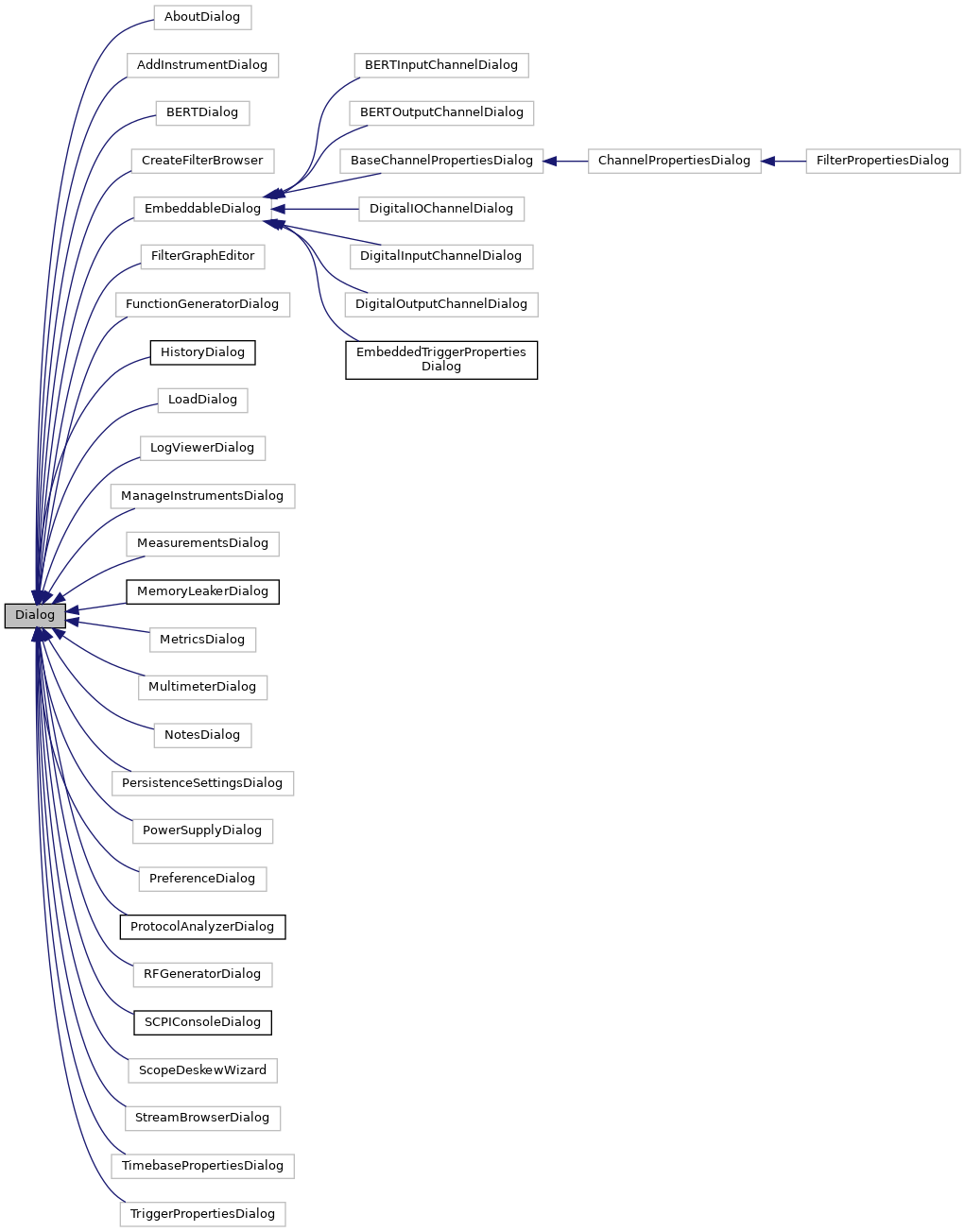
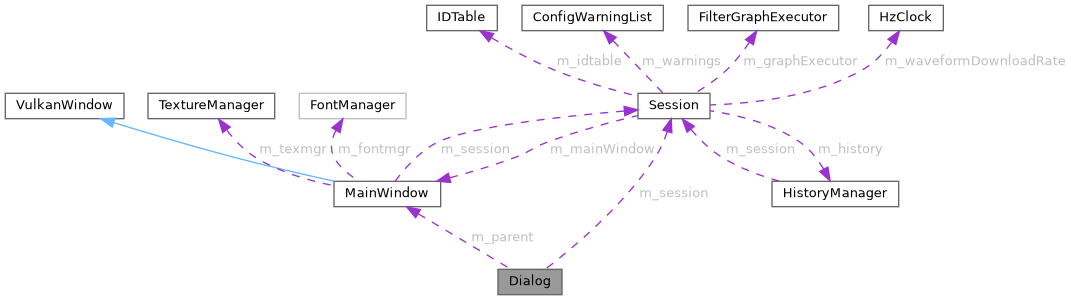
Generic dialog box or other popup window. More...
#include <Dialog.h>
Public Member Functions | |
| Dialog (const std::string &title, const std::string &id, ImVec2 defaultSize=ImVec2(300, 100), Session *session=nullptr, MainWindow *parent=nullptr) | |
| virtual bool | Render () |
| Renders the dialog and handles UI events. | |
| void | RenderAsChild () |
| Runs the dialog's contents directly into a parent window. | |
| virtual bool | DoRender ()=0 |
| const std::string & | GetID () |
| std::string | GetTitleAndID () |
| template<typename T > | |
| bool | renderEditableProperty (float width, const string &label, string ¤tValue, T &committedValue, Unit unit, const char *tooltip, optional< ImVec4 > optcolor, bool allow7SegmentDisplay, bool explicitApply) |
| Render an editable numeric value. | |
Static Public Member Functions | |
| static bool | Combo (const std::string &label, const std::vector< std::string > &items, int &selection, bool *open=nullptr) |
| Displays a combo box from a vector<string> | |
| static bool | UnitInputWithImplicitApply (const std::string &label, std::string ¤tValue, float &committedValue, Unit unit) |
| Input box for a floating point value with an associated unit. | |
| static bool | UnitInputWithImplicitApply (const std::string &label, std::string ¤tValue, double &committedValue, Unit unit) |
| Input box for a double precision floating point value with an associated unit. | |
| static bool | UnitInputWithImplicitApply (const std::string &label, std::string ¤tValue, int64_t &committedValue, Unit unit) |
| Input box for an integer value with an associated unit. | |
| static bool | TextInputWithImplicitApply (const std::string &label, std::string ¤tValue, std::string &committedValue) |
| static void | Tooltip (const std::string &str, bool allowDisabled=false) |
| Helper based on imgui demo for displaying tooltip text over the previously rendered widget. | |
| static void | HelpMarker (const std::string &str) |
| static void | HelpMarker (const std::string &header, const std::vector< std::string > &bullets) |
Protected Member Functions | |
| bool | TextInputWithExplicitApply (const std::string &label, std::string ¤tValue, std::string &committedValue) |
| bool | IntInputWithImplicitApply (const std::string &label, int ¤tValue, int &committedValue) |
| bool | UnitInputWithExplicitApply (const std::string &label, std::string ¤tValue, float &committedValue, Unit unit) |
| Input box for a floating point value with an associated unit and an "apply" button. | |
| void | renderNumericValue (const std::string &value, bool &clicked, bool &hovered, std::optional< ImVec4 > optcolor=std::nullopt, bool allow7SegmentDisplay=false, float digitHeight=0, bool clickable=true) |
| Render a numeric value. | |
| void | renderReadOnlyProperty (float width, const std::string &label, const std::string &value, const char *tooltip=nullptr) |
| Render a read-only instrument property value. | |
| template<typename T > | |
| bool | renderEditableProperty (float width, const std::string &label, std::string ¤tValue, T &committedValue, Unit unit, const char *tooltip=nullptr, std::optional< ImVec4 > optcolor=std::nullopt, bool allow7SegmentDisplay=false, bool explicitApply=false) |
| template<typename T > | |
| bool | renderEditablePropertyWithExplicitApply (float width, const std::string &label, std::string ¤tValue, T &committedValue, Unit unit, const char *tooltip=nullptr, std::optional< ImVec4 > optcolor=std::nullopt, bool allow7SegmentDisplay=false) |
| Render an editable numeric value with explicit apply (if the input value needs to explicitly be applied by clicking the apply button) | |
| void | renderBadge (float width, ImVec4 color, const std::string &label) |
| Render a badge with text inside. | |
| void | RenderErrorPopup () |
| Popup message when we fail to connect. | |
| void | ShowErrorPopup (const std::string &title, const std::string &msg) |
| Opens the error popup. | |
| void | Render7SegmentDigit (ImDrawList *drawList, uint8_t digit, ImVec2 size, ImVec2 position, float thikness, ImU32 colorOn, ImU32 colorOff) |
| Render a single digit in 7 segment display style. | |
| void | Render7SegmentValue (const std::string &value, ImVec4 color, float digitHeight) |
| Render a numeric value with a 7 segment display style. | |
| void | Render7SegmentValue (const std::string &value, ImVec4 color, float digitHeight, bool &clicked, bool &hovered, bool clickable=true) |
| Render a numeric value with a 7 segment display style. | |
Protected Attributes | |
| bool | m_open |
| std::string | m_id |
| std::string | m_title |
| ImVec2 | m_defaultSize |
| std::string | m_errorPopupTitle |
| std::string | m_errorPopupMessage |
| Session * | m_session |
| optional reference to session | |
| MainWindow * | m_parent |
| optional reference to parent MainWindow | |
| ImGuiID | m_editedItemId = 0 |
| Id of the item currently beeing edited. | |
| ImGuiID | m_lastEditedItemId = 0 |
| Id of the last edited item. | |
Detailed Description
Generic dialog box or other popup window.
Member Function Documentation
◆ Combo()
|
static |
Displays a combo box from a vector<string>
- Parameters
-
open optional boolean indicating the dropdown is open
◆ DoRender()
Implemented in AboutDialog, AddInstrumentDialog, BERTOutputChannelDialog, ChannelPropertiesDialog, FilterGraphEditor, FilterGraphErrorWindow, FilterPropertiesDialog, HardwareFlagsDialog, HistoryDialog, ManageInstrumentsDialog, MemoryDialog, MetricsDialog, PreferenceDialog, ScopeDeskewWizard, TriggerPropertiesDialog, BERTInputChannelDialog, CreateFilterBrowser, DigitalInputChannelDialog, DigitalIOChannelDialog, DigitalOutputChannelDialog, MeasurementsDialog, NotesDialog, ProtocolAnalyzerDialog, StreamBrowserDialog, and TutorialWizard.
◆ Render()
|
virtual |
Renders the dialog and handles UI events.
- Returns
- True if we should continue showing the dialog False if it's been closed
Reimplemented in FilterGraphEditor, FilterGraphErrorWindow, FilterPropertiesDialog, BERTInputChannelDialog, ProtocolAnalyzerDialog, and TutorialWizard.
◆ Render7SegmentDigit()
|
protected |
Render a single digit in 7 segment display style.
- Parameters
-
drawList the drawList used for rendering digit the digit to render size the size of the digit position the position of the digit thickness the thickness of a segment colorOn the color for an "on" segment colorOff the color for an "off" segment
◆ Render7SegmentValue() [1/2]
|
protected |
Render a numeric value with a 7 segment display style.
- Parameters
-
value the string representation of the value to display (may include the unit) color the color to use digitHeight the height of a digit
◆ Render7SegmentValue() [2/2]
|
protected |
Render a numeric value with a 7 segment display style.
- Parameters
-
value the string representation of the value to display (may include the unit) color the color to use digitHeight the height of a digit clicked output value for clicked state hovered output value for hovered state clickable true (default) if the displayed value should be clickable
◆ renderBadge()
Render a badge with text inside.
- Parameters
-
width the width of the badge color the badge color label the text of the badge
◆ renderEditableProperty()
| bool Dialog::renderEditableProperty | ( | float | width, |
| const string & | label, | ||
| string & | currentValue, | ||
| T & | committedValue, | ||
| Unit | unit, | ||
| const char * | tooltip, | ||
| optional< ImVec4 > | optcolor, | ||
| bool | allow7SegmentDisplay, | ||
| bool | explicitApply | ||
| ) |
Render an editable numeric value.
- Parameters
-
width the width of the input value (if <0 will be ignored, if =0 will default to 6*ImGui::GetStyle()) label the value label (used as a label for the TextInput) currentValue the string representation of the current value comittedValue the last comitted typed (float, double or int64_t) value unit the Unit of the value tooltip if not null, will add the provided text as an help marker (defaults to nullptr) optcolor the optional color to use (defaults to text color) clicked output value for clicked state hovered output value for hovered state allow7SegmentDisplay (defaults to false) true if the value can be displayed in 7 segment format explicitApply (defaults to false) true if the input value needs to explicitly be applied (by clicking the apply button)
- Returns
- true if the value has changed
◆ renderEditablePropertyWithExplicitApply()
|
protected |
Render an editable numeric value with explicit apply (if the input value needs to explicitly be applied by clicking the apply button)
- Parameters
-
width the width of the input value (if <0 will be ignored, if =0 will default to 6*ImGui::GetStyle()) label the value label (used as a label for the TextInput) currentValue the string representation of the current value comittedValue the last comitted typed (float, double or int64_t) value unit the Unit of the value tooltip if not null, will add the provided text as an help marker (defaults to nullptr) optcolor the optional color to use (defaults to text color) clicked output value for clicked state hovered output value for hovered state allow7SegmentDisplay (defaults to false) true if the value can be displayed in 7 segment format
- Returns
- true if the value has changed
◆ renderNumericValue()
|
protected |
Render a numeric value.
- Parameters
-
value the string representation of the value to display (may include the unit) clicked output value for clicked state hovered output value for hovered state optcolor the optional color to use (defaults to text color) allow7SegmentDisplay (defaults to false) true if the value can be displayed in 7 segment format digitHeight the height of a digit (if 0 (defualt), will use ImGui::GetFontSize()) clickable true (default) if the displayed value should be clickable
◆ renderReadOnlyProperty()
|
protected |
Render a read-only instrument property value.
- Parameters
-
label the value label (used as a label for the property) currentValue the string representation of the current value tooltip if not null, will add the provided text as an help marker (defaults to nullptr)
◆ UnitInputWithExplicitApply()
|
protected |
Input box for a floating point value with an associated unit and an "apply" button.
- Parameters
-
label Text label currentValue Current text box content committedValue Most recently applied value unit The unit for the input
- Returns
- True the "apply" button is pressed
◆ UnitInputWithImplicitApply() [1/3]
|
static |
Input box for a double precision floating point value with an associated unit.
- Parameters
-
label Text label currentValue Current text box content committedValue Most recently applied value unit The unit for the input
- Returns
- True when focus is lost or user presses enter
◆ UnitInputWithImplicitApply() [2/3]
|
static |
Input box for a floating point value with an associated unit.
- Parameters
-
label Text label currentValue Current text box content committedValue Most recently applied value unit The unit for the input
- Returns
- True when focus is lost or user presses enter
◆ UnitInputWithImplicitApply() [3/3]
|
static |
Input box for an integer value with an associated unit.
- Parameters
-
label Text label currentValue Current text box content committedValue Most recently applied value unit The unit for the input
- Returns
- True when focus is lost or user presses enter
The documentation for this class was generated from the following files:
- src/ngscopeclient/Dialog.h
- src/ngscopeclient/Dialog.cpp